Check these things before you start
First confirm that you actually received Pirate Shop Access. Opening the Item Shop or finding the banner does not itself award a token. If you are still searching, use the acquisition guide first.
Decide whether you can use the next 14 days. Activating when you will be away may waste part of the claim window. Balance that choice against the activation deadline shown in your account; do not leave it until a deadline you have not checked.
Activate it from the Item Shop
- Return to the lobby. Review the reward notification and make sure you are using the account that received access.
- Open the Item Shop. Look for the Pirate Shop or Plunder the Shop banner associated with your reward.
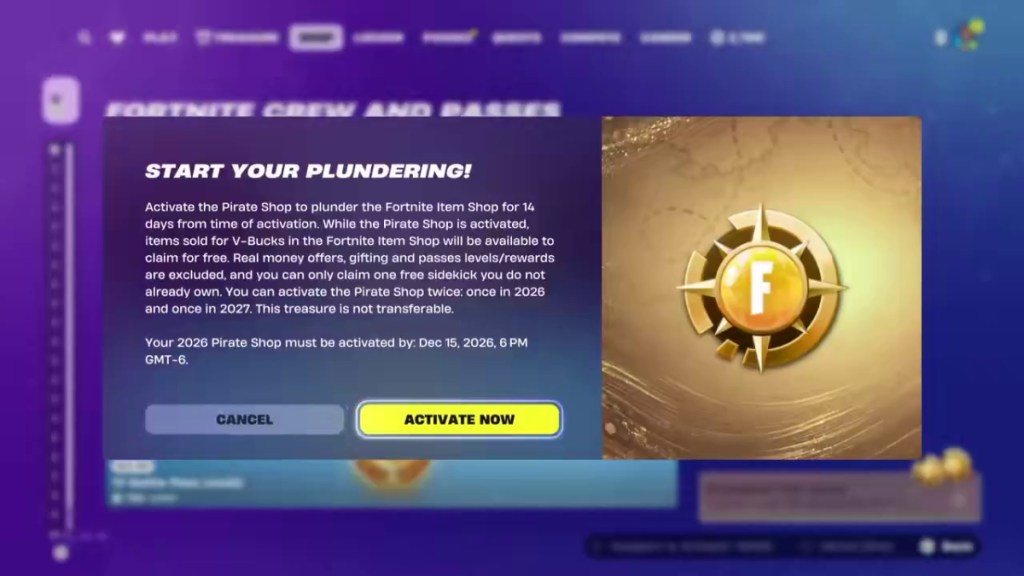
- Open the activation panel. Check which year's access you are about to use and read the displayed dates and exclusions.
- Choose Activate Now when ready. Confirm only when you intend to begin the 14-day period.
- Check the active status. Review an eligible item's claim screen and confirm it is offered free before completing the claim.
The banner's position and controller prompts may differ by platform or interface update. Follow the labels in your game rather than relying on a fixed screen corner or a specific controller button.
The activation panel and workflow are shown in Beebom's activation screenshot. The in-game terms shown on your own account take priority if the interface changes.
Keep the deadline separate from the timer
The 2026 reward has a reported activation deadline of December 15, 2026. The game screenshot reviewed shows 6 PM GMT−6; check your account's displayed time rather than treating the date as midnight in your own region.
The 14-day claim window is measured from activation. It is separate from the deadline for starting access and from the season's event schedule. Once active, the shop can change during that period, so check what is available when you play.
A second activation is for 2027. Review its availability and deadline in-game when it becomes usable; do not assume the 2026 token's screen tells you every rule for next year.
See GamesRadar's dates and reward explanation and the pictured activation terms.
Claim only eligible items
Real-money offers, gifting, and pass levels or rewards are excluded. The terms also limit free Sidekicks to one you do not already own. Read the full overview of included items and restrictions if you are unsure.
The access period does not mean every Fortnite cosmetic is available at once. Choose from the eligible offers in the shop while your window is active, and verify each confirmation screen before completing a claim.